 Chamber Culture
Chamber Culture
Chamber Culture
Your roster is the asset. Member management software is the system that keeps it accurate: the business record, the people beneath it, the dues and renewals, what each member actually engages with, the portal they update themselves, and the directory the public sees. Chamber Culture CRM does all of it on one record, with published pricing from $150/mo.
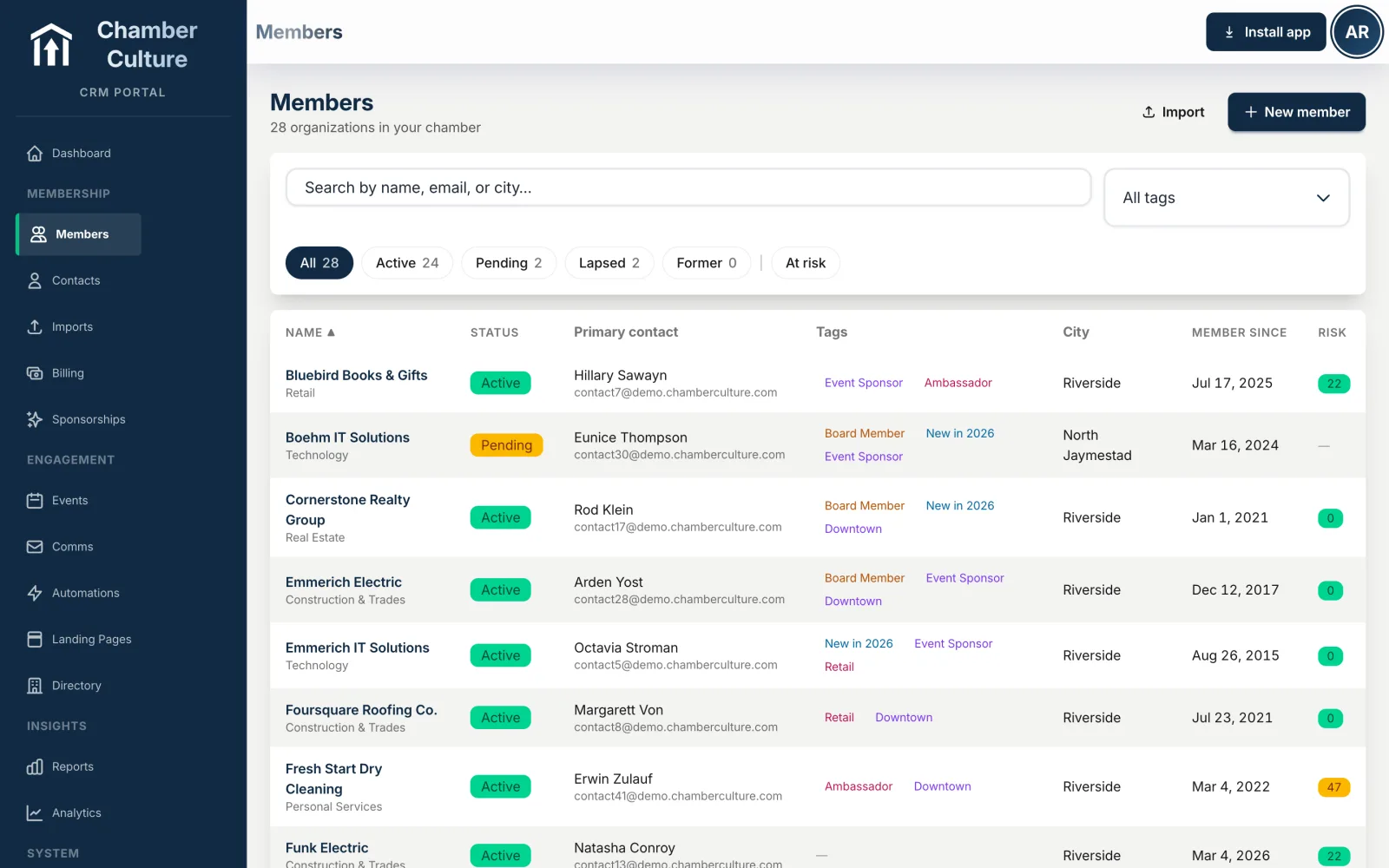
Member management software holds the roster and everything attached to it: the business, its people, its dues, its history and its public listing. For a chamber, the test is whether one change updates all of them at once.
Every chamber has one asset that cannot be rebuilt over a weekend: an accurate list of who its members are, who to call there, what they pay and what they have done with the chamber. Everything else runs off it. The renewal invoice goes to the wrong person because the roster is stale. The event email misses the new marketing manager because the roster is stale. The directory shows a business that closed in March because the roster is stale.
Member management software exists to stop that decay. Not to store the list, which a spreadsheet does perfectly well, but to keep it correct without a person doing the correcting. The difference between a good system and a filing cabinet is how much of the maintenance happens without staff.
There is a second reason it matters more for a chamber than for most member organizations: turnover. Chamber staffs are small, and the person who knows which member is really the decision maker is frequently the person who leaves. A roster that carries the context, and not just the contact details, is what makes that survivable.
This is where generic membership tools break for chambers, and it is worth being specific about why.
In a club program, a member is a person. One row, one email address, one payment method. In a chamber, the member is a business, and beneath it sit several people who each need something different: an owner who signs, a bookkeeper who pays the invoice, a marketing manager who updates the listing and posts the deals, and two staff who attend the lunches. They are not duplicates of the membership. They are roles on it.
What that means practically:
When a chamber tells us its old system was "fine except for contacts," this is nearly always what it means. The membership was modeled as a person, and every workaround since has been an attempt to cope with the fact that it is not.
Renewals are the part of member management that most rewards automation, because the work is predictable and the cost of forgetting is a lost member.
A membership management program worth its price should carry the membership term on the record, raise the invoice on schedule, send the reminder sequence without anyone starting it, accept card or ACH online, support autopay so the renewal happens without a decision, and mark the record paid the instant the money arrives. Late-stage dunning should be a setting, not a to-do list.
Two things separate a system that helps from one that just records. The first is autopay, which reliably moves the renewal rate more than any reminder copy, because it converts an annual decision into a default. The second is reconciliation: whether a payment posts against an invoice against a member automatically, or whether someone matches a bank line to a name every month.
The detail on gateways, autopay, receipts and reconciliation lives on the dues and billing software page. The point here is narrower: dues belong on the member record, not in a separate payments tool, because a payment that is not attached to a member cannot tell you anything about that member.
The roster tells you who your members are. Engagement tells you which of them are still with you.
The signals a chamber can genuinely act on are ordinary ones: event registrations and actual attendance, email opens and clicks, portal logins, directory listing updates, referrals sent and received, sponsorships taken. None is meaningful alone. Together they separate the member who is embedded in the chamber from the member who is about to quietly not renew.
The practical requirement is that these land on the member record automatically. A chamber that has to assemble engagement from four exports will do it once a year, in the week before renewals, which is too late to change the outcome. A chamber whose system already knows will spot the drift in month four, when a phone call still works.
What to do with the signal is a longer subject, and we wrote it up separately in the guide to tracking member engagement and the one on member retention.
Email sent from a separate tool is email sent to a list that was accurate the day it was exported. Sending from the roster instead means the audience is a query rather than a file: every primary contact at a member in good standing, everyone who attended last year's gala, every business whose dues lapse in thirty days.
That matters for two reasons beyond convenience. Deliverability improves because lapsed and bounced addresses leave the audience automatically rather than waiting for the next export. And the send is recorded on the member record, so when a board member asks whether a business was told about a deadline, the answer is on the screen instead of in somebody's sent folder.
Each contact at a member carries its own address and its own preferences, so the billing contact can get invoices without getting the newsletter, and unsubscribing from one does not silence the other.
The largest single saving in staff hours from modern member management software is not automation of a task staff do. It is the removal of tasks staff should never have had.
Given a portal, a member logs in and pays an outstanding invoice, updates its own address and hours, swaps a departed staff member for a new one, edits its directory listing, registers for the next lunch and downloads its own receipts. None of those requests reach the chamber inbox. The roster stays current because the people who know the answer are the ones editing it.
Two things make a portal work rather than sit unused: it has to be genuinely worth logging into, which means the directory listing and the invoices both live there, and access has to be granular enough that a business is willing to give it to junior staff. The member portal software page covers what belongs behind that login.
The directory is the member-facing half of the roster, and it is the half members judge the membership by.
For most members, the directory is the membership. It is the thing they show their partner when asked what the dues buy, and it is the reason a prospect looks at your website at all.
Which makes it a member management question rather than a website question. A directory maintained separately from the roster is wrong within a month: a business changes its phone number in the chamber's records and the public listing keeps the old one. A directory generated from the roster is right by construction, and every member who updates their own listing is also updating your database.
The right arrangement is one record, published two ways: internally for staff, publicly for visitors, with the member controlling what the public sees within limits the chamber sets. Category search, maps, hours and photos then cost nothing extra to keep accurate, because nobody is keeping them accurate twice.
What a chamber should expect from membership directory software is three things the roster makes possible. Visibility: every member gets a real indexable page rather than a row in a PDF, so the listing is findable by someone who has never heard of the chamber. Each one on this platform is a free website for chamber members on the chamber's own domain. Search: visitors look for what a business does, not its legal name, so category and keyword search matter more than alphabetical order. Renewals: a listing a member values is the easiest renewal argument there is, and because the listing is generated from the roster you can show a member their own directory traffic when the invoice goes out. Members maintain their own entry through the member portal, so accuracy does not cost staff time.
The questions a chamber board asks every quarter are small in number and awkward to answer from spreadsheets: how many members do we have, how many did we lose, what is outstanding in dues, and is engagement up or down. When members, dues, events and email all sit on one record, those are queries rather than reconciliation projects.
The reports worth expecting are retention and churn by month, dues billed against dues collected with the aging behind it, event attendance by member, and a view of who has not interacted with the chamber in a defined period. The last one is the most useful and the least common, because it only works if engagement is stored against the member rather than inside four other tools.
Ask in any demo whether a report can be exported and whether the numbers in two different reports agree. Separate systems produce a membership count and a billing count that differ, and nobody can say which is right.
Most tools sold as membership management software model a member as a person. A chamber member is a business with several people beneath it, its own dues schedule and a public listing, so the checklist below is the one to take into any demo, ours included.
If you are comparing named products rather than capabilities, the best chamber of commerce software roundup does that side by side.
Member management is one layer of a chamber's system, and the words around it get used loosely, so here is how we use them.
They are not separate products and there is nothing to bolt together. They are names for parts of one member record, which is the whole argument for buying them as one system.
Member management software is the system that holds an organization's roster and everything attached to it: who the members are, who works there, what they pay, when they renew, what they have attended, and how they appear in a public directory. For a chamber of commerce the member is a business rather than a person, so chamber member management software has to hold a company record with several contacts and reps beneath it, not a single row per human.
Yes. Chamber Culture CRM is membership management software built specifically for chambers of commerce, not a generic club or association tool. A member is a business record with contacts and reps beneath it, its own dues schedule and renewal date, engagement history, a self-service portal and a live public directory listing, all on one record. See the published pricing or the wider chamber software overview.
A club or gym program is built around an individual membership: one person, one payment, one login. A chamber membership belongs to a business, with multiple staff who each need their own access, a primary contact who receives the invoice, and a directory listing the whole company appears in. Generic membership management programs can be bent into that shape, but dues, event pricing and directory listings then have to be reconciled by hand, which is where the second spreadsheet comes from.
It should attach the membership term to the member record, raise the renewal invoice on schedule, send the reminders without anyone remembering to, take card or ACH payment online, offer autopay so the renewal happens without a decision, and mark the record paid the moment the money lands. The measure of a good system is how few renewals a staffer has to touch by hand. See dues and billing →
In a modern system, yes. A member portal lets a business log in to pay an invoice, update its directory listing, add or remove staff, register for events and see its own history. Self-service is the difference between a roster that stays accurate on its own and one that decays until staff run an annual clean-up, and it is usually the single largest saving in staff hours a chamber gets from switching.
Chamber Culture CRM publishes its pricing: $150/mo under 500 members, $300/mo for 500 to 2,000, and $500/mo for 2,000 to 10,000, billed month to month with the chamber website included. Legacy association management platforms commonly run several thousand dollars a year once setup fees and per-module upcharges are added. See published pricing →
Businesses, contacts and reps, dues, engagement, a self-service portal and a live directory, all on one member record.
Get started →