 Chamber Culture
Chamber Culture
Chamber Culture
Chamber management software is an all-in-one platform that helps a chamber of commerce or trade association manage its members, collect dues, run events, send email, and publish a member directory — all from a single database. Also called association management software (AMS), it replaces spreadsheets and disconnected tools with one shared system of record.
By Kevin Champlin, founder of Champlin Enterprises, builder of Chamber Culture CRM. · Reviewed: September 2026.
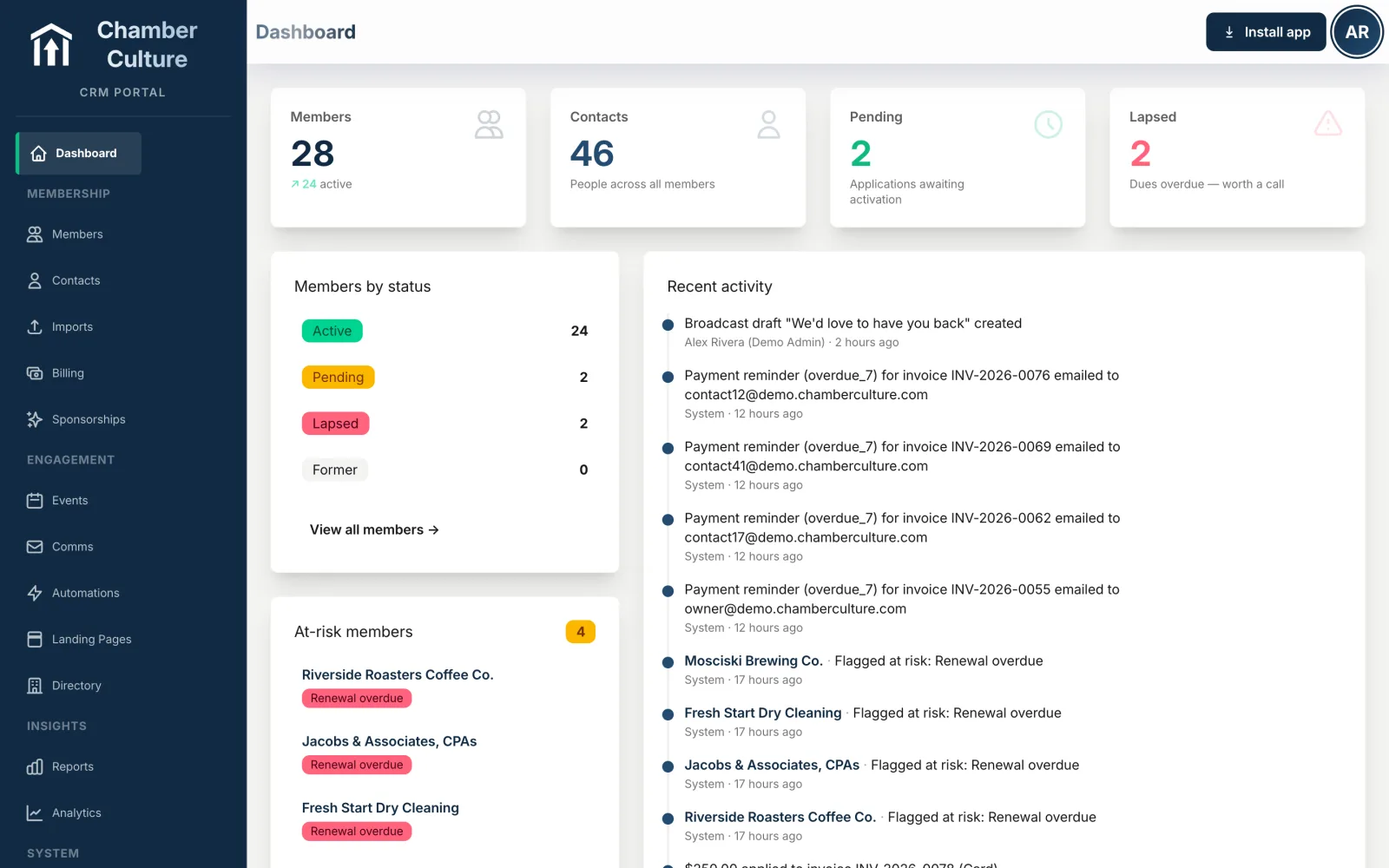
A chamber of commerce runs on relationships and repeatable operations: recruiting members, billing dues, hosting events, sending updates, and helping members find each other. Do all of that in spreadsheets, an email tool, a payment processor, and a separate event platform, and the data drifts apart within a month. A dues payment posts in one place, a new contact in another, an RSVP in a third — and nobody has the full picture of any member.
Chamber management software solves that by putting every member interaction on one record. When someone registers for a lunch, renews their membership, opens a newsletter, or updates their directory listing, it all attaches to the same profile. Staff get an accurate, shared view of the organization; members get one login for everything; and the board gets reporting that reflects reality instead of a hand-built spreadsheet from last quarter.
In practice, that means fewer dropped renewals, less double data entry, and far less institutional knowledge trapped in one person's inbox. It is the difference between running the chamber and constantly reconciling it.
You will see this category called several things. A chamber management system and chamber management software mean the same thing, and a chamber CRM is the member-relationship layer inside it. The words matter less than whether the pieces share one member record.
Any serious chamber platform should cover these. The newest platforms add AI on top rather than treating it as a separate product.
One record per member business and per person, with history, notes, and custom fields — the system of record everything else hangs off.
Automated renewals, invoicing, and card/ACH payments, so revenue collection stops depending on someone remembering to send reminders.
Ticketing, RSVPs, sponsorships, and on-site check-in for luncheons, mixers, ribbon cuttings, and the annual gala.
Segmented email to members, prospects, and event attendees, sent from your own address and tracked against member records.
A searchable directory on your website that stays in sync with your data — the member benefit prospects check before joining.
Retention, revenue, event attendance, and growth at a glance — the numbers your board asks for every meeting.
Members log in to pay dues, update their listing, register for events, and access benefits without emailing staff.
Drafting newsletters and posts, answering questions of your data in plain English, and flagging members at risk of lapsing. See what AI chamber management software does when it is built in rather than bolted on.
Accounting (QuickBooks), payment processors, and website tools, so the platform fits the stack you already run.
The obvious answer is chambers of commerce — local, regional, and state chambers that manage member businesses, collect annual dues, and run a calendar of networking events. But the same category of software serves a wider set of member-based organizations:
Inside a chamber, the day-to-day users are usually a small team: an executive director, a membership coordinator, and often a volunteer board or ambassador committee. Because the staff is small and turnover is real, the biggest practical benefit is continuity — when everything lives in one system instead of one person's head, a staffing change doesn't reset the organization.
These three terms get used interchangeably, but they solve different problems:
The full operational system: membership, dues, events, email, and reporting in one place. It is purpose-built for member organizations and is what most people mean by "chamber management software." Its strength is depth; its historic weakness is a dated, click-heavy interface.
Originally sales software for tracking contacts, deals, and pipelines. A general CRM is flexible and modern but doesn't natively understand dues, renewals, or a public directory — you'd have to build those. For a deeper breakdown, see our guide on AMS vs CRM for chambers.
Tools like WordPress or Squarespace publish your public site but don't manage members or money. Many chambers run a website builder alongside an AMS — and the friction is keeping the member directory on the website in sync with the member data in the AMS.
The modern approach blends the best of the first two: the ease and modern interface of a CRM with the member-management depth of an AMS. That is exactly where Chamber Culture CRM sits — a chamber-first platform that behaves like a modern CRM but handles dues, events, and a live directory like a purpose-built AMS.
Most chambers keep their software for years, so the choice matters. A practical checklist:
If you're weighing specific products, our comparison hub and a detailed look at how ChamberMaster handles members, dues and events lay out the trade-offs side by side.
Pricing splits into two eras. Modern, transparently priced platforms like Chamber Culture CRM publish their tiers and start around $150 per month, scaling with member count. Legacy association-management systems — ChamberMaster/GrowthZone, MemberClicks, and similar — commonly run $4,000 to $10,000+ per year once setup fees and à-la-carte modules are added, and most gate their pricing behind a demo request.
The range is wide because size, add-ons, payment-processing markups, and contract length all move the number. We break it all down, vendor by vendor, in the dedicated guide: How much does chamber management software cost? You can also see our own published tiers on the pricing page.
The published column is the one that matters. Most of this market still asks you to book a call before it will name a number. For our own tiers in full, see Chamber Culture CRM pricing.
| Platform | Price | What it scales on |
|---|---|---|
| Chamber Culture CRM | Published: $150 / $300 / $500 per month ($1,800 / $3,600 / $6,000 a year) | Chamber size band: under 500, 500 to 2,000, 2,000 to 10,000 members |
| GrowthZone and ChamberMaster | Not published. The pricing page asks you to request a demo; reported floors run around $3,900 a year | Quoted, by organization size and modules |
| Novi AMS | Not published. Reported at roughly $9,948 to $43,464 a year | Quoted, with setup reported at $3,600 to $20,900 |
| Wild Apricot | Reported at roughly $672 to $6,672 a year | Per contact, so the bill grows as your list does |
| MemberClicks | Reported at roughly $3,108 to $7,188 a year | Quoted, by size and modules |
| Glue Up | Reported at roughly $3,000 to $18,500 a year | Quoted, by tier and organization size |
| Setup and migration | $0 to $1,000, depending on the size and messiness of your data | Legacy setup fees are commonly reported at $3,600 to $20,900 |
Chamber Culture CRM figures are our own published tiers, on the pricing page. Every other row is the publicly reported range cited on that same page and on our comparison hub, and is not a quote from that vendor: none of them publishes a price. Confirm current numbers with the vendor before you budget. All other names are trademarks of their respective owners.
Events are where chamber software either earns its keep or quietly fails. A general event tool will sell tickets, but it does not know who your members are, so member pricing has to be applied by hand, the attendee list does not land on the member record, and next year nobody can tell you which members actually showed up.
Event management built into a chamber platform closes that loop: member pricing applies automatically because the system knows the buyer is a member, a poster QR code takes someone from the street to a registration form on their phone, the ticket arrives by email, staff check people in with a camera, and a walk-in guest can be typed in at the door and linked to a member business or saved as a follow-up contact. The attendance then shows up on the member record, which is what makes renewal conversations concrete.
Sponsorships, committee assignments and the recap reporting sit in the same place, so the event does not need a spreadsheet alongside it. See what our chamber event management software does in practice →
Nearly every vendor in this category now says it has AI. The useful question is not whether a platform has AI but what the AI is wired to, because a chatbot that has never seen your member record can only write generic paragraphs.
AI that is actually connected to the chamber does three things worth paying for. It drafts communications in your chamber’s own voice, using the real member and event details, for a human to review and send. It answers questions about your own data in plain English, so "lapsed members in Q2 by tier" is a question rather than a report-builder project. And it flags members who look likely to lapse, before renewal season, with a suggested next action.
Two things to check on any platform: whether AI is included in the plan you are buying or sits one tier up, and whether the AI can write to your financial records. Ours is included at every tier and is deliberately read-only against invoices and payments. See what AI-native actually means →
Chamber management software is an all-in-one platform that helps a chamber of commerce or trade association manage its members, collect dues, run events, send email, and publish a member directory from a single database. It's a type of association management software (AMS) and replaces spreadsheets and disconnected tools with one shared system of record.
Mostly, yes. Association management software (AMS) is the broader industry term for the all-in-one systems member-based organizations use to manage membership, dues, events, and communication. Chamber management software is AMS aimed specifically at chambers of commerce, so it emphasizes the member directory, referrals, ambassador programs, and event sponsorship that chambers rely on.
Look for a member and contact database, dues billing and online payments, event registration with check-in, email and newsletters, a public searchable member directory, reporting and dashboards, and a member self-service portal. Modern platforms add AI for drafting communications, plain-English reporting, and flagging members at risk of not renewing.
It keeps one record per member and attaches everything else to it. The member database is the system of record, so a dues invoice, a payment, an event registration, a check-in and an email open are all stored against that same business rather than in four separate tools. In practice that means member pricing applies automatically at registration because the platform already knows who is a member, renewals bill from the same record the directory listing is published from, and attendance history is visible during a renewal conversation. Nothing is re-keyed between systems, so the numbers on the board report reconcile. For how a legacy platform handles the same job, see the ChamberMaster comparison →
It varies widely. Modern, transparently priced options such as Chamber Culture CRM start at about $150/mo, while legacy association-management systems commonly run $4,000–$10,000+ per year once setup and add-ons are included. See the full cost breakdown →
Even a chamber with a few dozen members benefits once dues, events, and email start living in different tools. A single system keeps member records accurate, automates renewals, and lets one part-time staffer or a volunteer board run the chamber without institutional knowledge walking out the door. Transparent, low-cost tiers make it affordable at small scale.
Members, dues, events, email, and a live directory in one place — with AI included and pricing published up front.
Get started →